From RAG to AI Agent
A step-by-step guide to transform your RAG pipelines into effective AI agents.
If you're interested in this topic, you can check out the Colab notebook as well.
2025 was the year of LLM reasoning. Most LLM providers focused on improving the ability of their LLMs to reason, make decisions, and carry out long-horizon tasks with the least possible amount of human intervention. RAG pipelines, so hyped in the last couple of years, are now a thing of the past: the focus shifted on AI agents, a term that only recently seems to have acquired a relatively well-defined meaning:
An LLM agent runs tools in a loop to achieve a goal.
While simple, the concept at a first glance might seem to you very far from the one of RAG. But is it?
In this post I want to show you how you can extend your RAG pipelines step by step to become agents without having to throw away everything you've built so far. In fact, if you have a very good RAG system today, your future agents are bound to have great research skills right away. You may even find that you may be already half-way through the process of converting your pipeline into an agent without knowing it.
Let's see how it's done.
1. Start from basic RAG
Our starting point, what's usually called "basic RAG" to distinguish it from more advanced RAG implementations, is a system with a retrieval step (be it vector-based, keyword-based, web search, hybrid, or anything else) that occurs every time the user sends a message to an LLM. Its architecture might look like this:
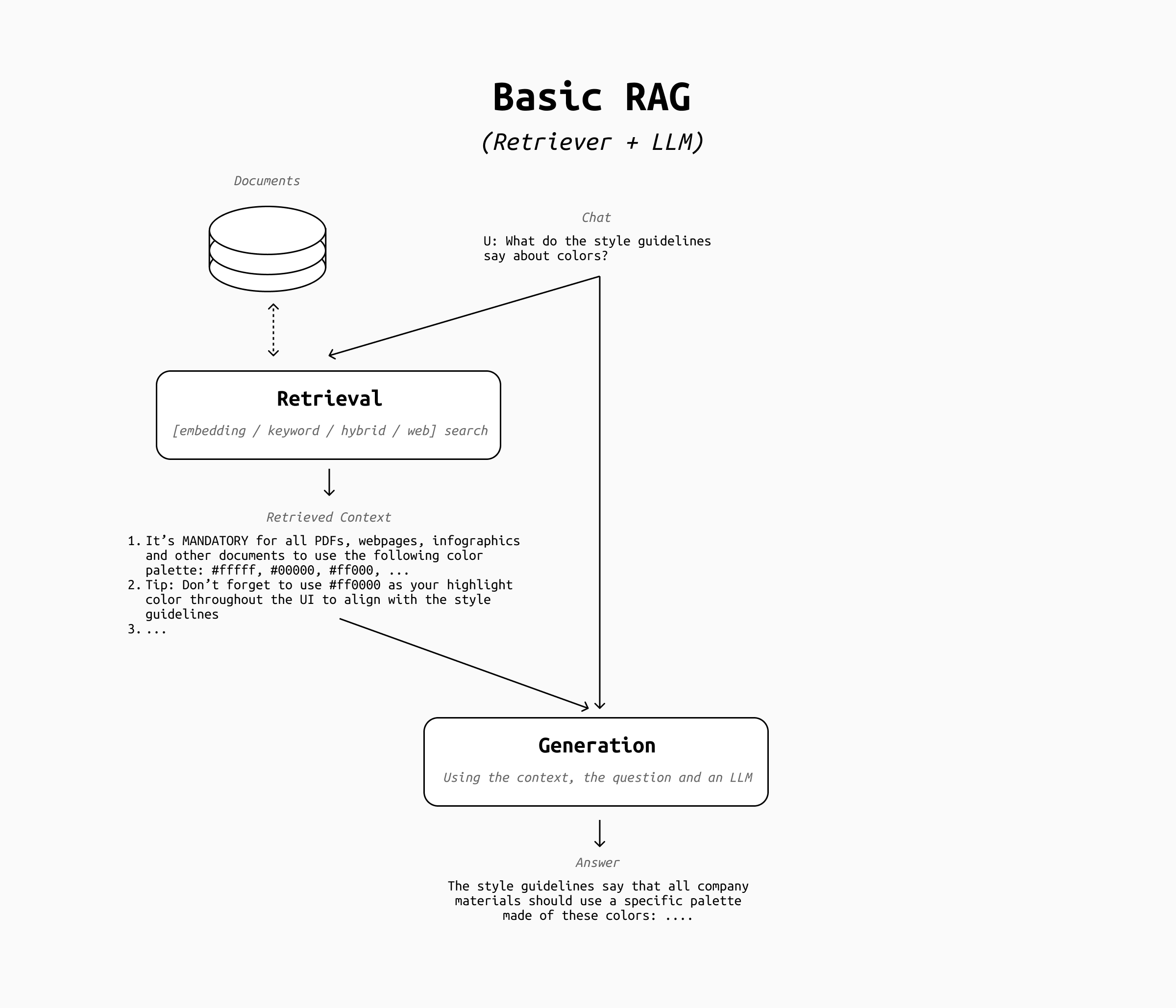
Systems with more than one retriever and/or a reranker step also fall under this category. What's crucial to distinguish basic RAG from more "agentic" versions of it is the fact that the retrieval step runs on every user message and that the user message is fed directly to the retriever.
2. Add Query Rewrite
The first major step towards agentic behavior is the query rewrite step. RAG pipelines with query rewrite don't send the user's message directly to the retriever, but rewrite it to improve the outcomes of the retrieval.
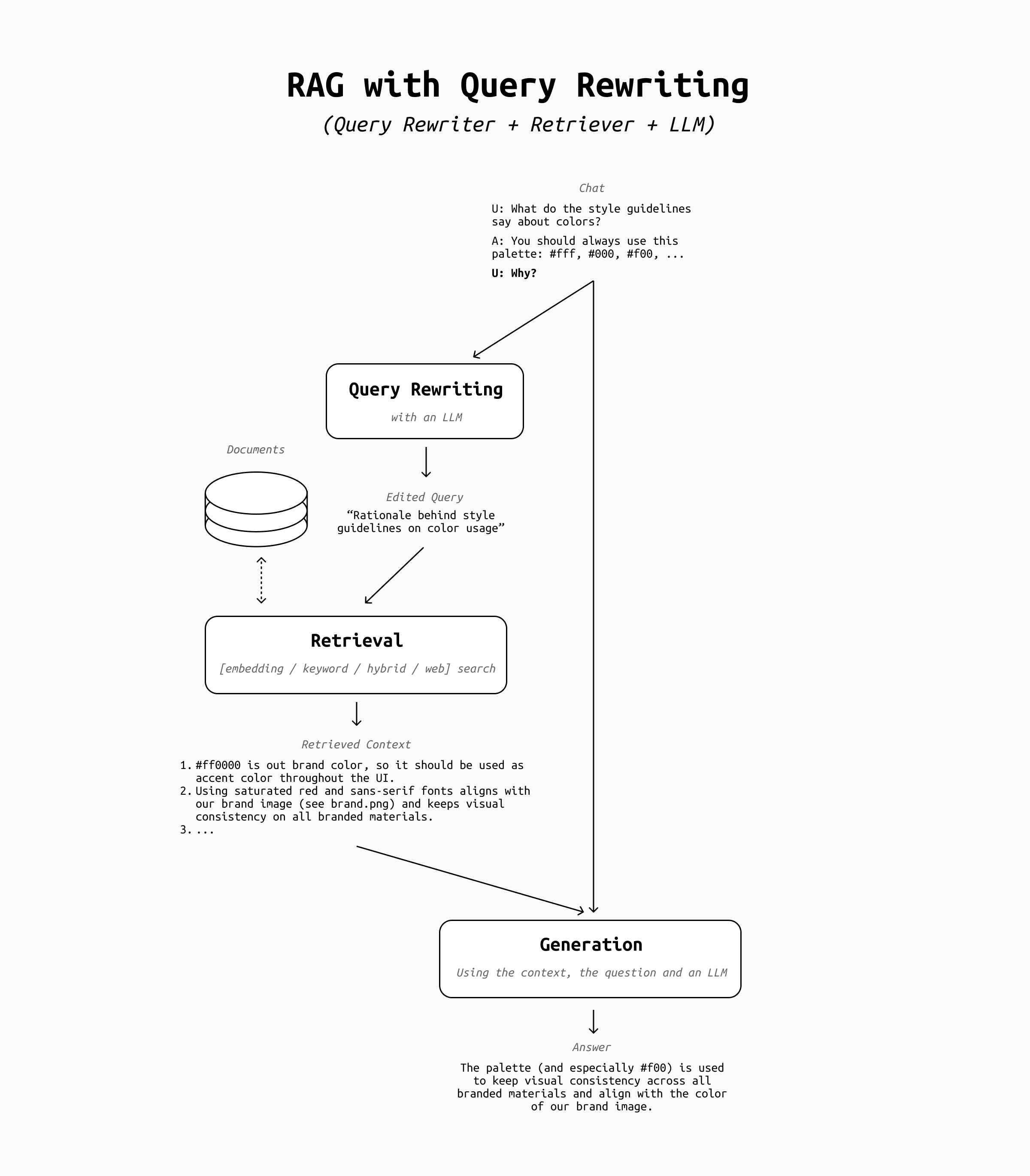
Query rewrite is a bit of a double-edged sword. In some cases it may make your RAG pipeline less reliable, because the LLM may misunderstand your intent and query the retriever with an unexpected prompt. It also introduces a delay, as there is one more round-trip to the LLM to make. However, a well implemented query rewrite step has a huge impact on follow-up questions.
Think about a conversation like this:
User: What do the style guidelines say about the use of colors on our website?
Assistant: The style guidelines say that all company websites should use a specific palette made of these colors: ....
User: Why?
The first questions from the user is clear and detailed, so retrieval would probably return relevant results regardless of whether the query gets rewritten or not. However, the second question alone has far too little information to make sense on its own: sending the string "Why?" to a retriever is bound to return only garbage results, which may make the LLM respond something unexpected (and likely wrong).
In this case, query rewrite fixes the issue by expanding the "Why?" into a more reasonable query, such as "What's the reason the company mandated a specific color palette?" or "Rationale behind the company's brand color palette selection". This query helps the retriever find the type of information that's actually relevant and provide good context for the answer.
3. Optional Retrieval
Once query rewrite is in place, the next step is to give the pipeline some very basic decisional power. Specifically, I'm talking about skipping retrieval when it's not necessary.
Think about a conversation like this:
User: What do the style guidelines say about the use of colors on our website?
Assistant: The style guidelines say that all company websites should use a specific palette made of these colors: ....
User: List the colors as a table.
In this case, the LLM needs no additional context to be able to do what the user asks: it's actually better if the retrieval is skipped in order to save time, resources, and avoid potential failures during retrieval that might confuse it (such as the retriever bringing up irrelevant context snippets).
This means that even before query rewrite we should add another step, where the LLM gets to decide whether we should do any retrieval or not. The final architecture looks like this:
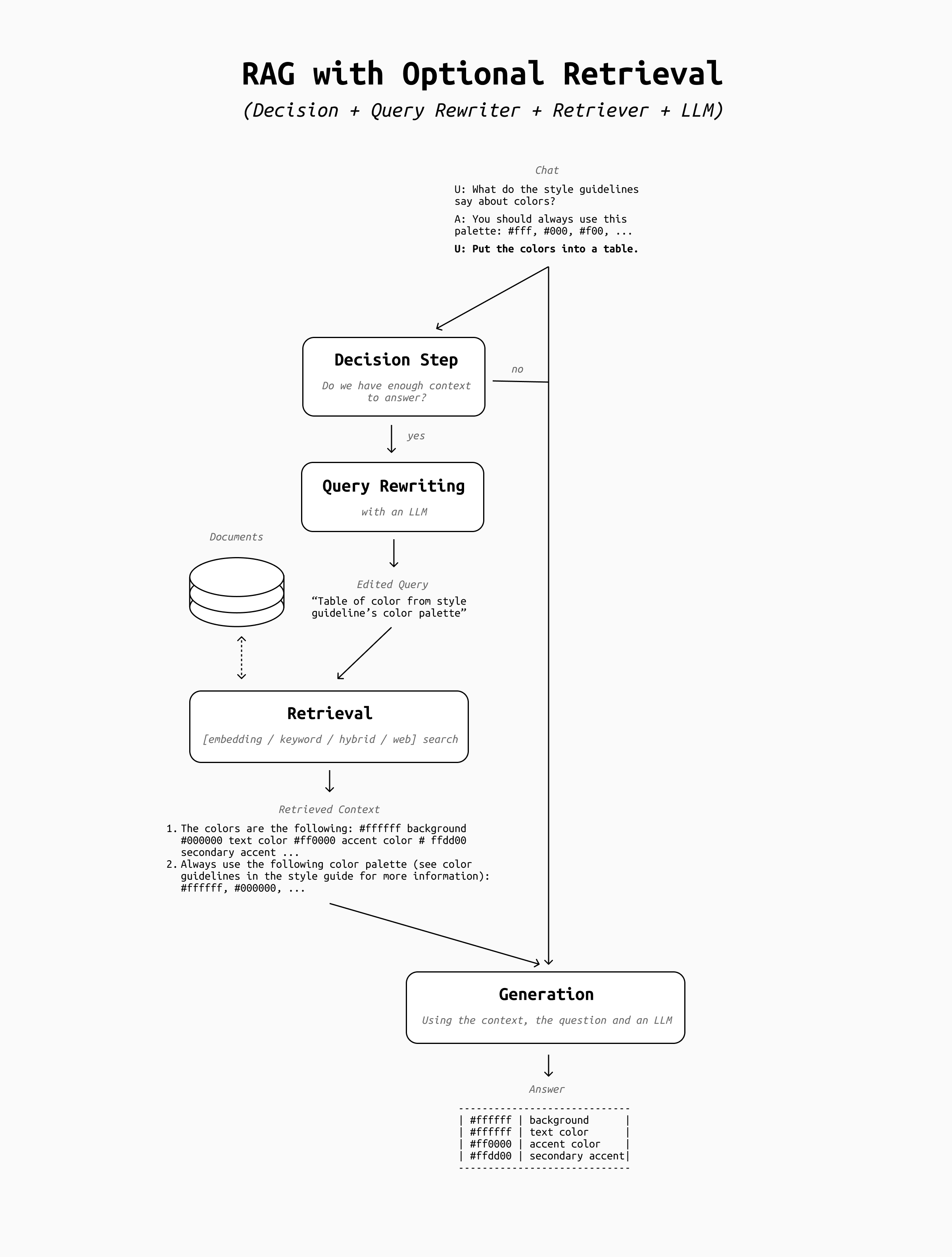
This is a critical step towards an AI agent: we are giving the LLM the power to take a decision, however simple the decision may look. This is the point where you should start to adapt your evaluation framework to measure how effective the LLM is at taking decisions, rather than its skills at interpreting the retrieved context or the effectiveness of your retrieval step alone. This is what Agent evaluation frameworks will do for you (see the bottom of the article for some suggestions).
4. The Agentic Loop
Once we have this structure in place, we're ready to give the LLM even more autonomy by introducing an agentic loop.
Since the LLM is now able to take the decision to retrieve or not retrieve based on the chat history, how about we let the LLM also review what context snippets were returned by the retriever, and decide whether the retrieval was successful or not?
To build this agentic loop you should add a new step between the retrieval and the generation step, where the retrieved context is sent to the LLM for review. If the LLM believes the context is relevant to the question and sufficient to answer it, the LLM can decide to proceed to the answer generation. If not, the process loops back to the query rewrite stage, and the retrieval runs again with a different query in the hope that better context will be found.
The resulting architecture looks like this:
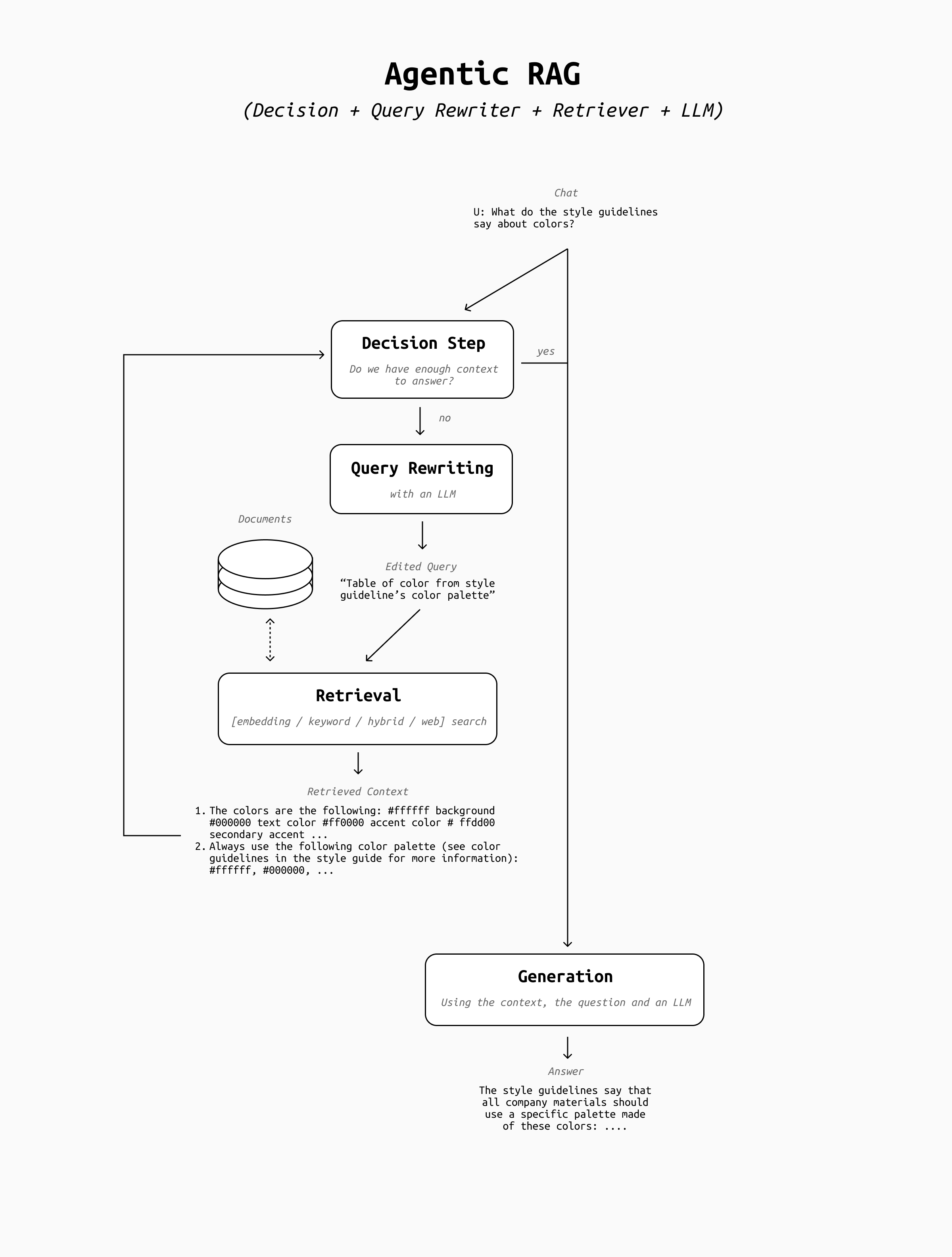
With the introduction of the agentic loop we've crossed the boundary of what constitutes an AI Agent, even though it's still a very simple one. The LLM is now in charge of deciding when the retrieval is good enough, and it can try as many times as it wants (up to a threshold of your choosing) until it's satisfied with the outcome.
If your retrieval step is well done and effective, this whole architecture may sound pointless. The LLM can hardly get better results by trying again if retrieval is already optimized and query rewriting is not making mistakes, so what's the point? In this case, the introduction of the agentic loop can be seen just as a necessary stepping stone towards the next upgrade: transforming retrieval into a tool.
5. Retrieval as a Tool
In many advanced RAG pipelines, retrieval of context and tool usage is seen as two very different operations. RAG is usually always on, highly custom, etc. while tools tend to be very small and simple, rarely called by the LLM, and sometimes implemented on standardized protocols like MCP.
This distinction is arbitrary and simply due to historical baggage. Retrieval can be a tool, so it's best to treat it like one!
Once you adopt this mindset, you'll see that the hints were there all along:
- We made retrieval optional, so the LLM can choose to either call it or not - like every other tool
- Query rewrite is the LLM choosing what input to provide to the retriever - as it does when it decides to call any other tool
- The retriever returns output that goes into the chat history to be used for the answer's generation - like the output of all other tools.
Transforming retrieval into a tool simplifies our architecture drastically and moves us fully into AI Agent territory:
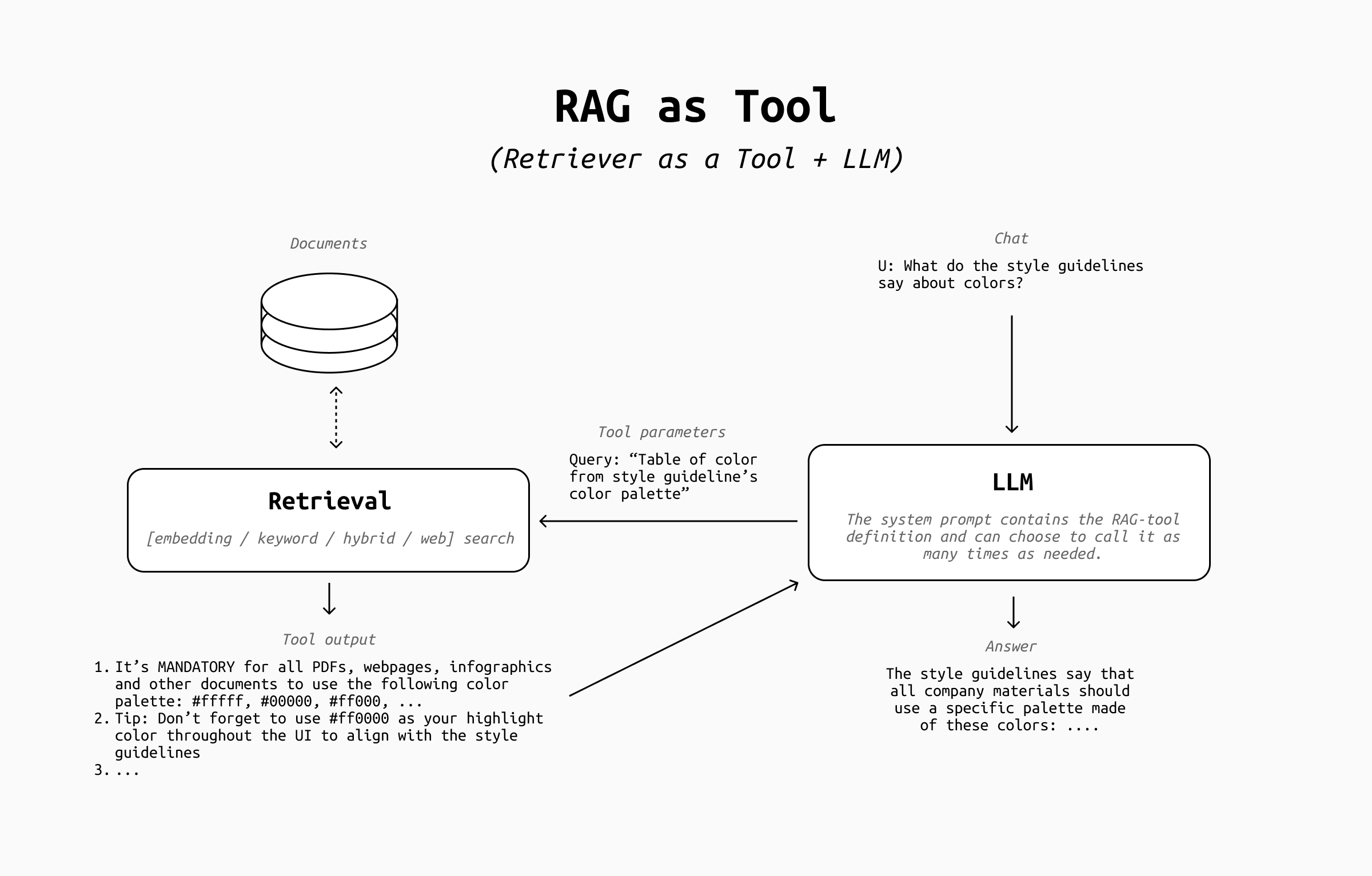
As you can see:
- The decision step is now part of the LLM's answer generation, which can call it as many times as it wants thanks to the tool calling loop
- The query rewrite comes for free as the LLM invokes the retrieval tool
- The retriever's output goes into the chat history to be used to answer the user's request
At this point it's time to address a common concern. You may have heard elsewhere that implementing retrieval as a tool makes the LLM "forget" to retrieve context when it should rather do it, so the effectiveness of your RAG worsens. This was very real a couple of years ago, but in my experience it's no longer relevant: modern LLMs are now trained to reach for tools all the time, so this problem has largely disappeared.
6. Add more tools
Congratulations! At this point you can call your system a true AI Agent. However, an agent with only a retrieval tool has limited use. It's time to add other tools!
To begin with, if your retrieval pipeline has a lot of moving parts (hybrid retriever, web search, image search, SQL queries, etc...) you can consider separating each of them into separate search tools for the LLM to use, or to expose more parameters to let the LLM customize the output mix.
Once that's done, adding other tools is trivial on a technical level, especially with protocols such as MCP. Using popular, open source MCPs may let you simplify your retrieval tool drastically: for example by leveraging GitHub's MCP instead of doing code search yourself, or Atlassian's MCPs instead of custom Jira/Confluence/BitBucket integrations, and so on.
However, keep in mind that adding too many tools and MCPs can overwhelm the LLM. You should carefully select which tools can expand the most your LLM's ability to solve your user's problems. For example, a GitHub MCP is irrelevant if only very few of your users are developers, and an image generation tool is useless if you're serving only developers. It's easy to overdo it, so make sure to review regularly the tools you make available to your LLM and add/remove them as necessary.
And in the rare case in which you actually need a lot of tools, consider letting the user plug them in as needed (like the ChatGPT UI does), or adopt a more sophisticated tool calling approach to make sure to manage the context window effectively.
Conclusion
That's it! You successfully transformed your RAG pipeline into a simple AI Agent. From here you can expand further by implementing planning steps, sub-agents, and more.
However, before going further you should remember that your retrieval-oriented metrics now are not sufficient anymore to evaluate the decision making skills of your system. If you've been using a RAG-only eval framework such as RAGAS it's now a good time to move on to a more general-purpose or agent-oriented eval framework, such as DeepEval, Galileo, Arize.ai or any other AI Agent framework of your choice.
Last but not least: if you want to see this entire process implemented in code, don't miss my workshop at the virtual Agentic AI Summit on the 21st of January, 2026! I'll be walking you through the entire process and show you some additional implementation details. See you there!