How does LLM memory work?
All LLMs can keep track of a short conversation. But how do they remember things long-term?
This is episode 6 of a series of shorter blog posts answering questions I received during the course of my work. They discuss common misconceptions and doubts about various generative AI technologies. You can find the whole series here: Practical Questions.
People often talk about an LLM "remembering" (or more often "forgetting") things. But how is that possible? LLMs are stateless algorithms that don't inherently have the ability to "remember" anything they see after their training is over. They don't have anything like databases, caches, logs. At inference time, LLMs produce the next token based only on its trained parameters and whatever text you include in the current request.
So what is "memory" in the context of LLM inference?
The chat history
When you're having a conversation with an LLM, the LLM does not remember what you've said in your previous messages. Every time it needs to generate a new token it re-reads everything that happened in the conversation so far, plus everything it has generated up to that point, to be able to decide what's the most likely next token. LLMs don't have any internal state: everything is recomputed from scratch for each output token.
💡 Methods exist to reduce the time complexity of LLM inference, mostly in the form of smart caching techniques (usually called prompt caching), but that's a story for another blog post.
This means that the chat history is not part of the LLM, but it's managed by the application built on top of it. It's the app's responsibility to store the chat history across turns and send it back to the LLM each time the user adds a new message to it.
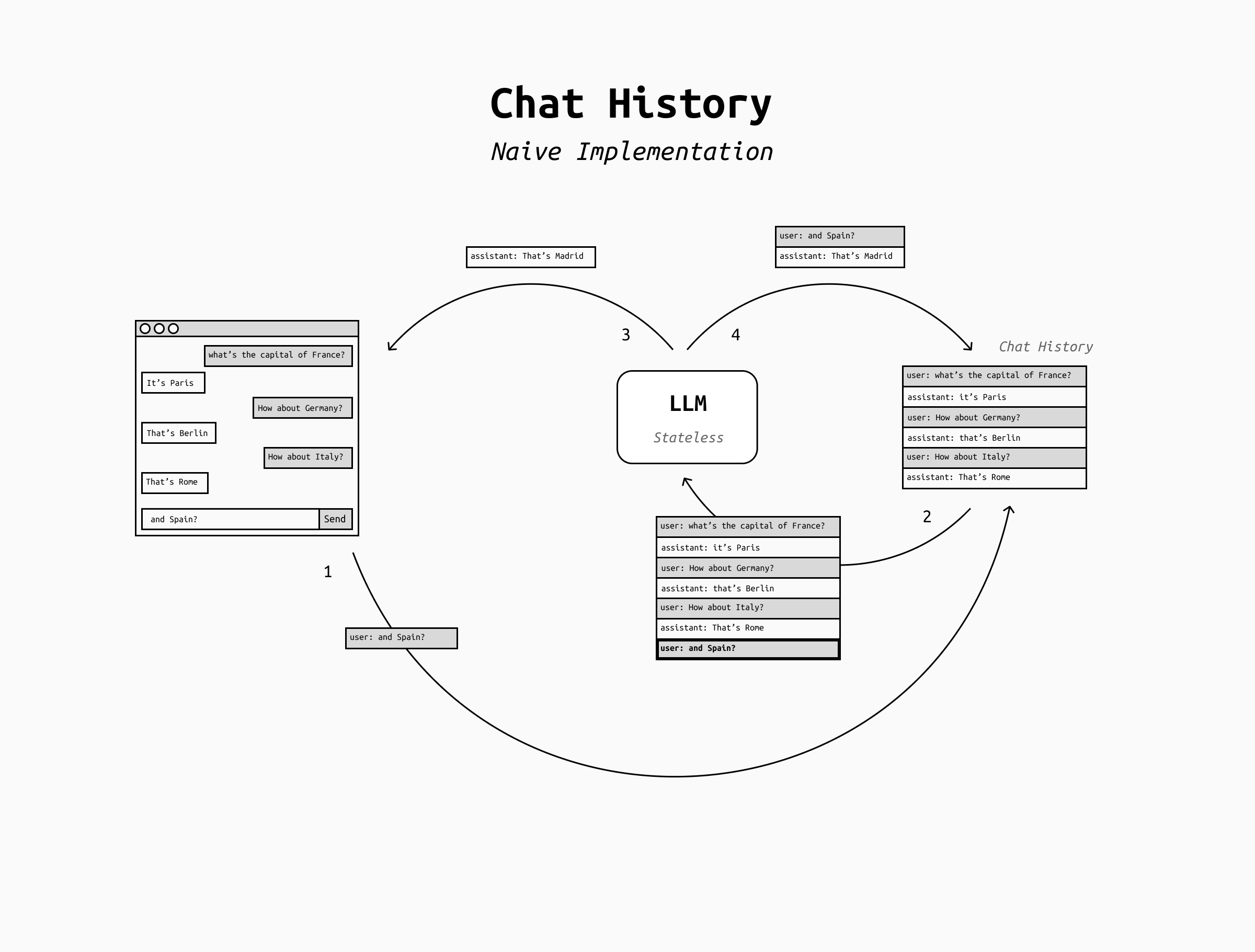
The storage of the chat history is the simplest implementation of what "memory" means for an LLM. We can call it short-term memory and it allows the LLM to have a coherent conversation for many turns.
However, this approach has a limit: the length of the conversation.
The context window
LLMs can only process a fixed maximum amount of text at once. This limit is called context window and includes both the user's input (which in turn includes all the chat history up to that point) plus the output tokens the LLM is generating. This is an unavoidable limitation of the architecture of Transformer-based LLMs (which includes all the LLMs you're likely to ever come across).
So, what happens when the context window fills up? In short, the LLM will crash.
To prevent a hard system crash, various LLM applications handle context window overflows differently. The two most basic approaches are:
- Hard failure (common in APIs): If you exceed the model’s context window, the request fails.
- Truncation/sliding window (common in chat apps): The application drops older parts of the conversation so the latest turns fit. This means that for each new token you or the LLM are adding to the chat, an older token disappears from the history, and the LLM "forgets" it. In practice, during a conversation this may look like the LLM forgetting older topics of conversation, or losing sight of its original goal, or forgetting the system prompt and other custom instruction you might have given at the start of the chat.
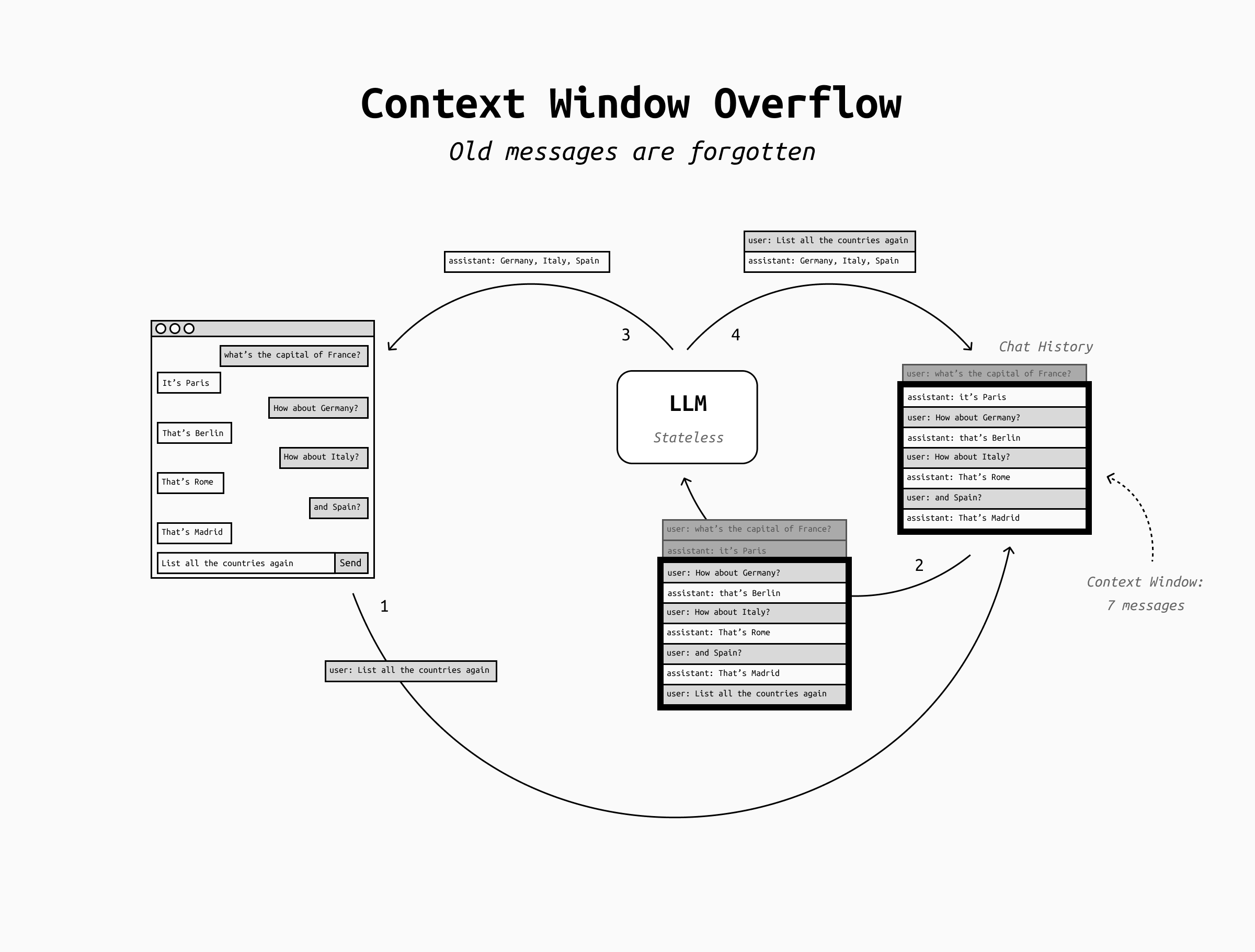
However, both of these are just patches over the fundamental problem that LLMs can't remember more than the content of their context window. How do we get around that to achieve long-term memory?
LLM memory is context engineering
Making LLMs able to remember very long conversations is a context engineering problem: the science of choosing what to put in the LLM's context window at each inference pass. The context window is a limited resource, and the best LLMs applications out there usually shine due to their superior approach to context engineering. The more you can compress the right information into the smallest possible context, the faster, better and cheaper your AI system will be.
In the case of long-term memory, the core of the problem is choosing what to remember and how to make it fit into the context window. There are three common approaches: summarization, scratchpad/state, and RAG. These are not mutually exclusive, you can mix and match them as needed.
Summarization
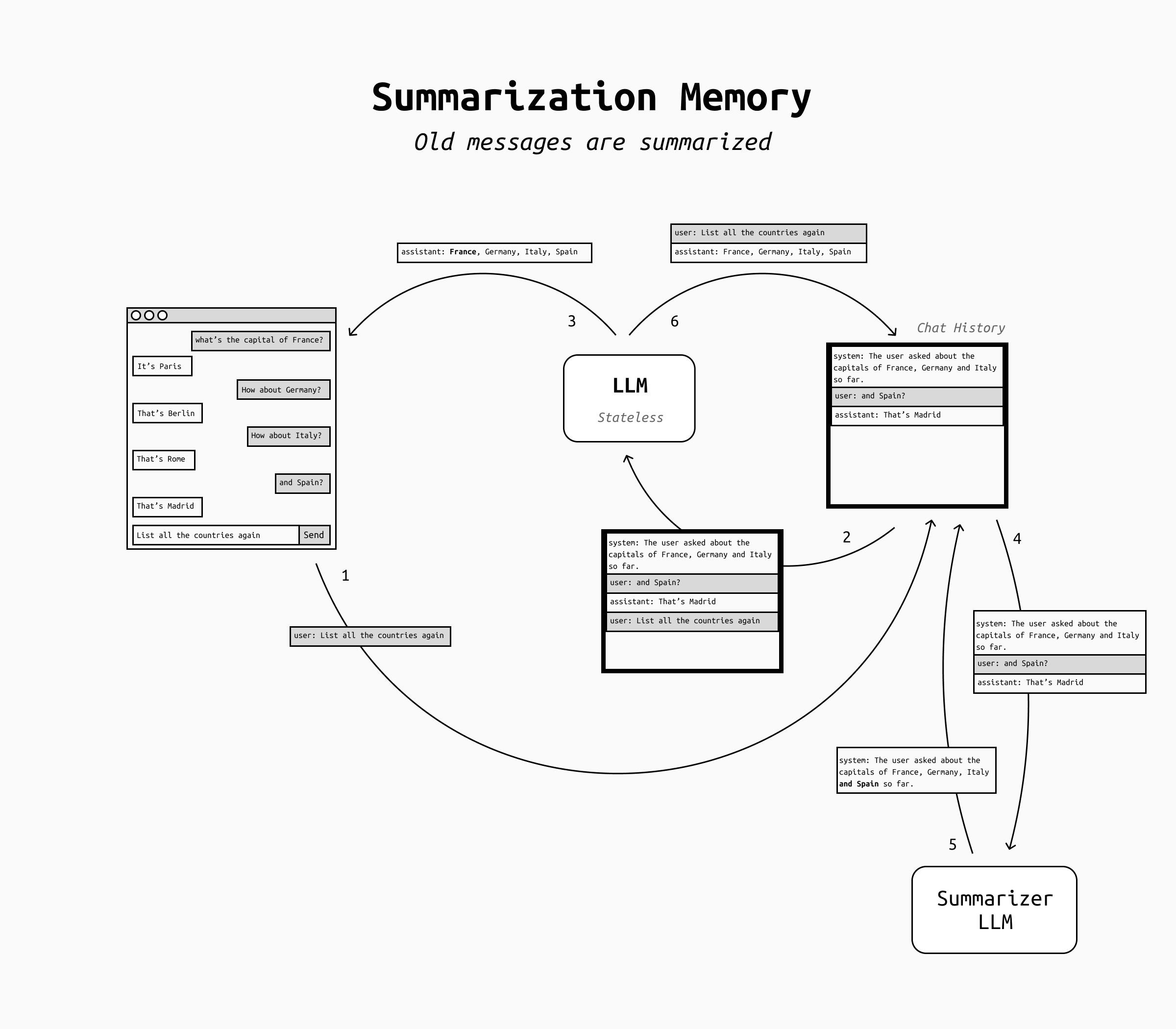
In the case of summarization-style memory, the idea is to "compress the past" to make it fit the context window. You keep recent messages verbatim, but you also maintain a rolling summary of older conversations and/or older messages in the same conversation. When the chat gets long, you update the summary and discard raw older turns.
This is a pragmatic fit for simple chatbots: most users don't expect perfect recall, but are happy with an LLM that sort of remembers a summary of what they talked about in the past. It's also rather cheap and very simple to implement, which makes it a perfect fit for a quick, initial implementation.
The main issue with summarization memory is that LLMs often don't know what details must be remembered and what can be discarded, so they're likely to forget some important details and this might frustrate the users.
In short, summarization memory achieves something very like human memory: infinitely compressible but likely to lose details in arbitrary ways. This works for role-playing chatbots for example, but not for personal assistants that are supposed to remember everything perfectly.
Scratchpad
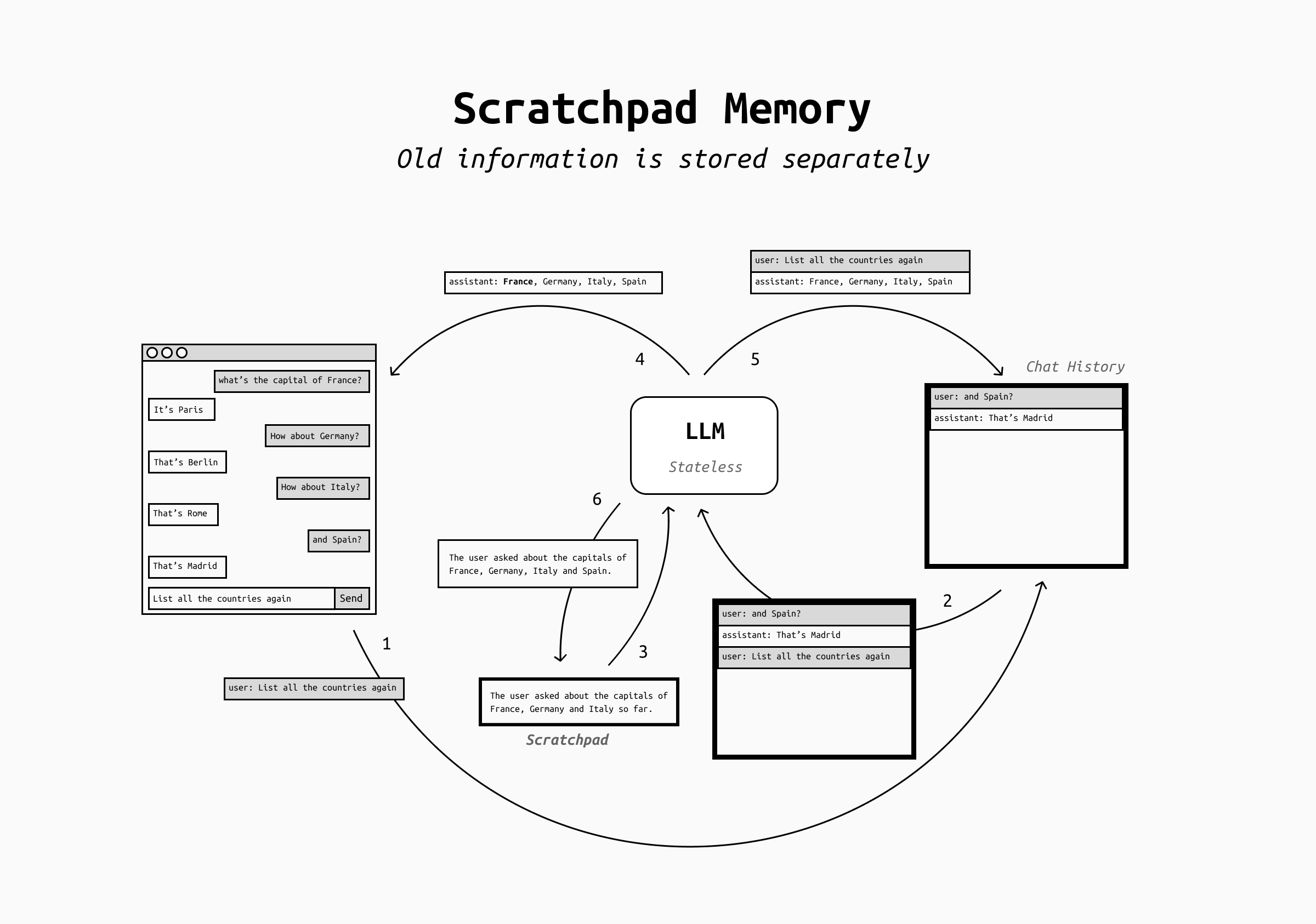
In order to overcome the fallacies of human memory, people use post-its and notebooks to store important details that can't be forgotten. Turns out that LLMs can do this too! This is called scratchpad / state approach and means that the LLM is now in charge of maintaining a small, structured "state" that represents what the assistant should not forget, such as user preferences current goals, open tasks, todo lists, key decisions, definitions and terminology agreed upon, and more.
This approach can be implemented in two ways:
- by giving a scratchpad tool to the LLMs, where the model can choose to write, edit or delete its content at all times,
- by having a separate LLM regularly review the conversation and populate the scratchpad.
In either case, the scratchpad content is then added to the conversation history (for example in the system prompt or in other dedicated sections) and older conversation messages are dropped.
This approach is far more controllable than summaries, because the LLM can be instructed carefully as of what it's critical to remember and how to save it into the scratchpad. Not only, but the users themselves can be allowed to read and edit the scratchpad to check what the LLM remembers, add more information, or even correct errors.
RAG Memory
But what if the scratchpad becomes itself huge and occupies a large share of the context window, or even overflows it? For agents that need to take on huge tasks (for example coding agents and deep research systems) the scratchpad approach might not be enough.
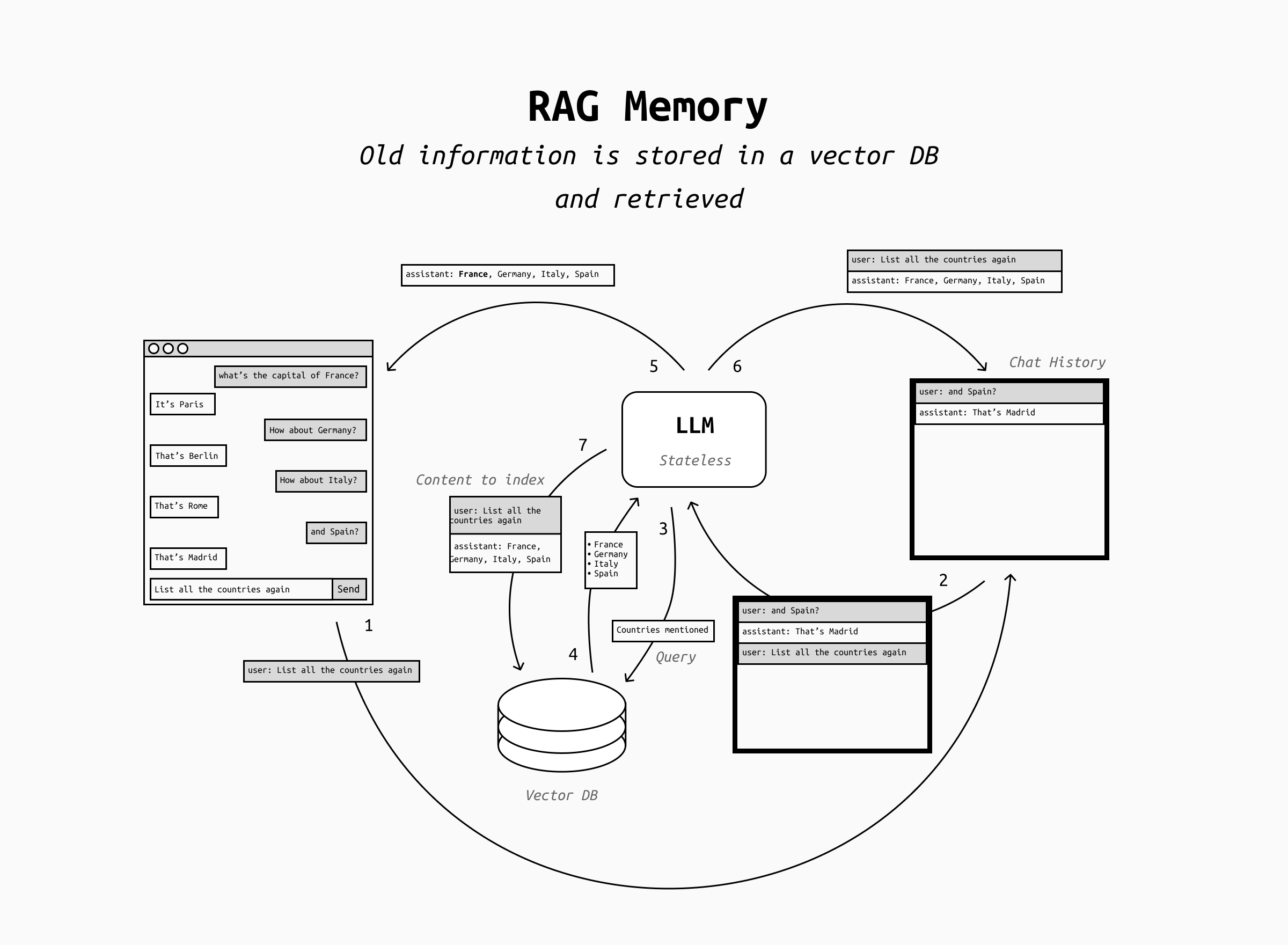
In this case we can start to treat memory as yet another data source and perform RAG over the scratchpad and/or the conversation history, stored in a vector DB and indexed regularly.
The advantage of RAG memory is that you can reuse all well-known patterns for RAG, with the only difference that the content to be retrieved is the chat history itself and/or the LLM's notes.
However, RAG memory suffers from the shortcomings of retrieval: as the retrieval pipeline is never absolutely perfect, you can't expect perfect recall. You'll have to pay attention to the quality of the memory retrieval, evaluate it carefully and regularly, and so on. This adds a new dimension to your agent's evaluation and in general quite a bit of complexity.
In addition, you may run into an additional problem that's unique to RAG memory: context stuffing. Context stuffing is the presence of retrieved snippets of context that look like prompts: they can cause problems because they might confuse the LLM into following the instruction contained in the retrieved snippet instead of the user's instruction.
While context stuffing can happen with malicious context snippets in regular RAG, it's also very likely to happen accidentally when implementing RAG-based memory that searches directly into the chat history. This happens because all the retrieved snippets were indeed user's prompts in the past! In this case, it's essential to make sure that the prompt identifies clearly the retrieved snippets as context and not prompts.
Conclusion
That's it! With any of these three approaches, your LLM-base application is now able to remember things long-term.
However, don't forget that the moment when you add memory to your LLM powered application, you're now storing user data, with all the problems that this brings. You will need to take care of retention, user control over the memorized data, you'll be storing PII and secrets, and in many cases this process needs to be compliant to whatever policy for data retention you may be subject to.